MealMap

MealMap takes the guess work out of grocery shopping and meal planning by using AI to learn your preferences, dietary needs, and budget and adjust your lists, shopping location, and in-store optimized route accordingly.
My Role
UX Research, UX Design
My Responsibilities
Research, wireframing, analysis, usability testing, prototyping, WCAG 2.1/2.2 compliance
Project Duration
2.5 months


No grocery shopping app creates meals, remembers when your favorites are running out, manages your pantry, allows you to import recipes from anywhere, and helps you navigate to your items in the store, and adapts to user accessibility needs - all in one app.
-The Problem
-The Process
1. Discovery
2. Define
3. Ideate
4. Validate
1. Discovery
9 individuals - ages 24 to 64 - were interviewed on their grocery shopping habits, technology usage, barriers, and accessibility needs.
User Interviews
“We just stopped [meal kit service] because we don’t like making those decisions (what to make for dinner). So, even though [meal kit service] is probably more expensive, it’s so easy just to not think about what’s for dinner tonight.” - participant 7
“When they do a reset, I can’t find anything… I have to look up at the aisles and see where things are listed." - participant 2
User Journey Map
%20(1).png)
Through the use of a user journey map, we identified common friction points, such as losing a written grocery list, having recipes stored in several different places, and struggling to locate items once in the grocery store. Using user journey map also told us what works well for users, so we could incorporate those features in the design.
2. Define
5 themes appeared after analyzing the user interviews:
-
Planning & Meal Decisions
-
Store Navigation
-
Digital Tool Adoption
-
Pain Points & Barriers
-
Substitutions & Budgeting
Thematic Analysis
Competitive Analysis

A competitive analysis was performed to identify gaps in existing apps. As one can see, no existing app is able to address all parts of the grocery shopping experience.
Task Analysis
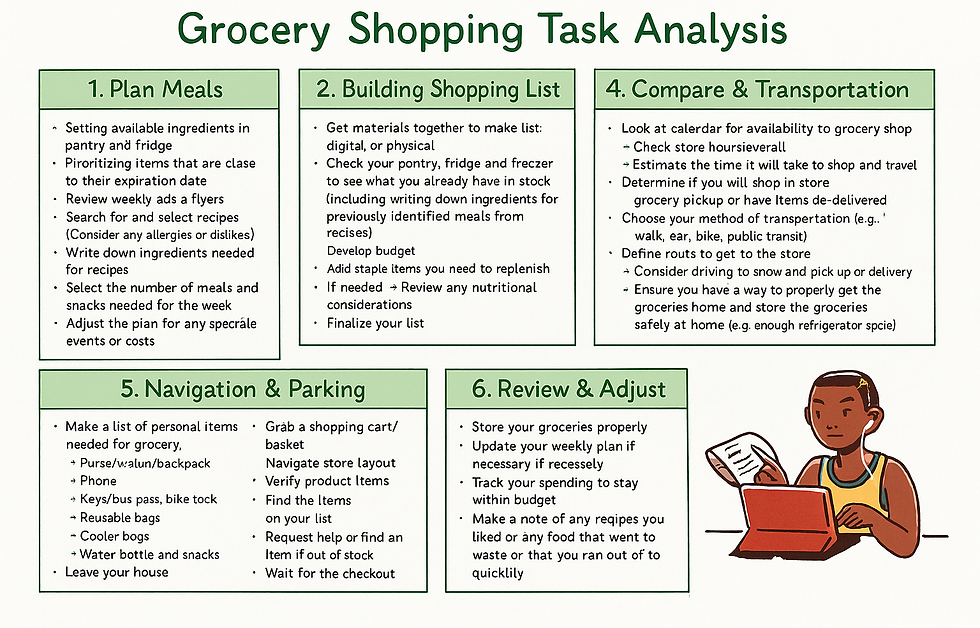.png)
-
Meal planning/decision-fatigue
-
Lack of "all-in-one" apps (i.e. one app to plan meals, another to get groceries/navigate the store, a third to manage the pantry, and a final to cook meals)
-
Trouble locating items in grocery stores
Core Gaps & Problems Identified
How might we help adults plan meals and shop more easily by using narrow AI to auto-build budget-aware lists, find the best store(s) and prices, plan multi-stop routes, and guide in-store item finding—while staying accessible for diverse needs?
Design Question
3. Ideate
-The Solution
.jpeg)
.jpeg)
%20(1).jpeg)
%20(1).jpeg)
.png)
.png)
.png)
.png)
Final Solution

Key features:
-
3 sections (Dietary Needs, Accessibility Needs, and Personalization Preferences) to ensure user needs are at the forefront of the experience and the AI's tailoring
-
Allows for multiple filtering inputs per each section
Onboarding
Key features:
-
AI generated meal plans as well as single AI generated meals
-
Upload recipe from outside source, write a recipe, recent recipes, and favorited recipes to allow users multiple ways to create, store, and access recipes
Recipes


Key features:
-
Quick look at 'Expiring Soon' and 'Low Stock' items
-
Categorized by storage (pantry, refrigerator, and freezer) for ease of locating items
-
Manage your food to prevent waste
Food Inventory
Key features:
-
Keep your grocery list easily accessible and organized
-
Create a grocery list multiple ways, including AI generated, previous lists, and write your own
-
AI monitors user behavior and recommends actions (i.e. "you already have milk", "you normally buy cinnamon when you buy oatmeal", etc.) to ensure users are buying everything they need without buying extras
Grocery Lists
.png)

Key features:
-
Optimized route assistance to help users find their items in the most efficient way possible using cell phone GPS and store layouts
-
Offers substitution suggestions in the case the store doesn't have an item on the list
In-Store Navigation
Key features:
-
AI and technology are not infallible, so I created several options for users should they run into trouble. For example, if they lose connection to WiFi during grocery shopping, they are able to try reconnecting, shopping in an offline mode, check out and come back later, or get human assistance.
Error Handling

Qualitative testing:
-
11 Think Aloud interviews
-
Sentiment analysis
-
1 open-ended trust question
%20(1).png)
As we can see through the use of sentiment analysis, participants had a overall more positive attitude towards MealMap after our first round of iteration.

Post-iteration, both main tasks (planning a meal and in-store navigation) were raised to acceptable SEQ scores and the SUS score improved as well. This shows the increased ease of use and usability of the system. Net Promoters - individuals that would suggest the system to friends - also significantly increased. DRT (Desirability, Relevance, and Trust) of the AI was improved as well.
4. Validate
Qualitative analysis
Sentiment analysis
Quantitative Analysis
Quantitative testing:
-
SEQ scoring
-
NPS scoring
-
SUS scoring
-
DRT (desirability, reliability, trust) scoring
Lesson Learned & Reflection
-
Users reported really enjoying the ease of AI generated meals. The decision fatigue of meal planning was addressed and the user needs were met.
-
Reminders to add frequently used items to the grocery list was also a favorited feature.
Wins
-
In-store navigation posed the biggest challenge. Using the live map to select items and move through the grocery list had too many clicks to select and confirm items. We added confirm on the list itself, rather than a pop-up on the map, but still poses the biggest friction point for users. I plan to continue working on this friction point.
-
During user testing, many users got focused on achieving the end goal (i.e. find the grocery item, check out, etc.) rather than exploring the app. This led to missed features or interaction opportunities. I learned its important to remind testers to naturally explore the app as well as work on achieving the goal.
Challenges